15.10.2026
Workstation Desks: What Are They & Who Are They For?
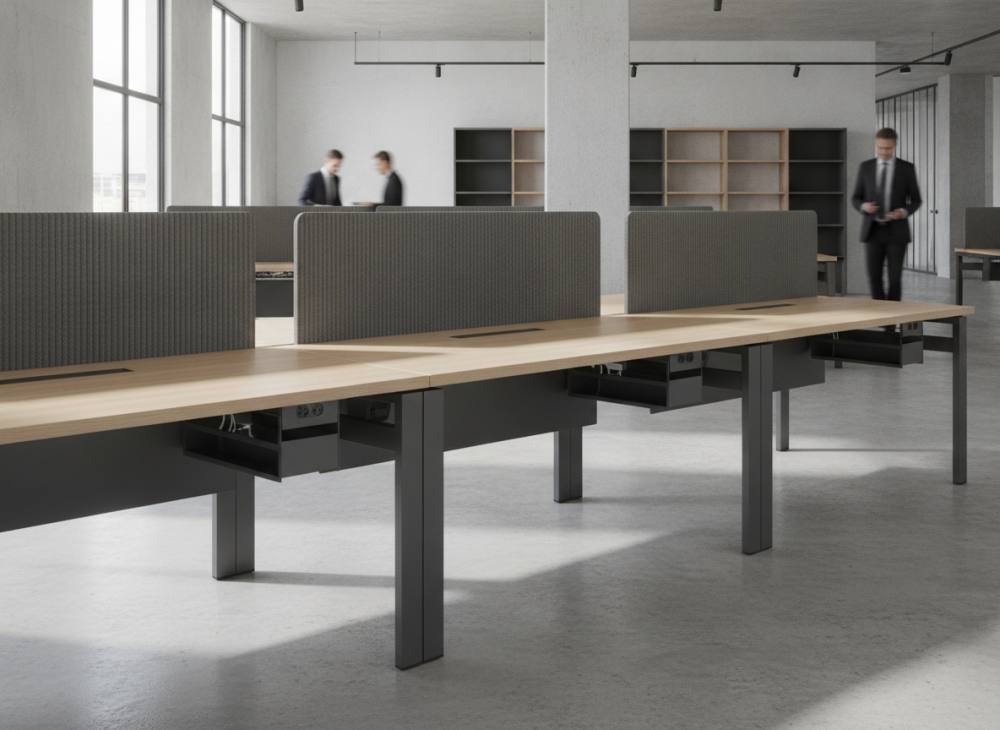
A workstation desk is a modular, multi-user desk system engineered to allow several team members to work efficiently and cohesively on a shared structural frame. Unlike standalone desks placed in rows or facing one another, workstation units integrate shared leg assemblies, unified cable management channels, and acoustic dividing panels into a cohesive architectural framework. In contemporary commercial design, they are widely specified to foster horizontal teamwork, optimize usable floor space, and eliminate unsightly electrical wiring across open layouts.
As corporate workflows become increasingly digital and cross-functional collaboration takes precedence, commercial spaces demand greater agility. Organizations must maximize square-meter efficiency without compromising employee focus and ergonomic wellness. When properly planned, modern modular workstation desks strike a careful balance between dynamic team dialogue and personal task privacy through tailored acoustic division.
Key Characteristics and Design Philosophy of Workstation Desk Systems
The structural philosophy of workstation systems centers on modularity, load-sharing mechanics, and integrated building infrastructure. Where conventional single desks require four individual legs and independent cable spirals, bench workstations utilize shared central legs and structural crossbeams. This unified engineering minimizes physical clutter beneath the work surface, facilitates routine cleaning, and ensures visual cohesion throughout large open floor plates.
From a technical infrastructure perspective, these systems feature high-capacity under-desk cable baskets, integrated power modules (energy boxes), and vertical cable risers. Electrical, Ethernet, and audio-visual lines travel seamlessly from floor access grommets or raised access floors directly into the desk core. By housing power and weak-current cabling within separated compartments, workstations mitigate electromagnetic interference and maintain a clean, organized work environment.
Modularity and Integrated Cable Management Infrastructure
A primary architectural benefit of multi-user workstations is their adaptability to organizational growth. A configuration that begins as a 2-person or 4-person cluster can be readily expanded into 6-person or 8-person pods through modular extension beams and intermediate leg frames. Continuous internal trunking channels ensure that each workstation user retains dedicated access to power outlets and data connections. Eliminating loose power strips from the floor surface not only elevates workplace aesthetics but also supports facility safety standards by preventing tripping hazards.
Acoustic Dividers and Balancing Privacy
The chief challenge of shared desk setups is ambient acoustic distraction and visual interruption. To address this, high-performance workstation systems incorporate fabric-wrapped acoustic dividing screens or frosted partition panels. Furnished with sound-absorbent acoustic cores, these screens mitigate sound transmission between adjacent and opposite desks. In addition to dampening conversational noise, dividers delineate personal boundaries, enabling staff to engage in concentrated work without feeling exposed in an open environment.
Which Office Types Are Workstation Desks Best Suited For?
Multi-person workstations are versatile, yet their practical suitability depends directly on department workflows, daily communication habits, and architectural layout parameters. When specified thoughtfully, these systems deliver measurable functional advantages across several distinct operational settings:
- Open-Plan Corporate Environments: Workstations establish layout rhythm and geometric order in organizations with horizontal hierarchies that value fluid knowledge transfer.
- Software Development, Tech, and Creative Studios: Teams engaged in iterative sprints, agile frameworks, or peer programming benefit substantially from 4-person or pod clusters that allow instant communication across desks.
- Operations, Logistics, and Customer Support Centers: In departments managing high-volume calls or administrative transactions, compact bench workstations with acoustic fabric dividers optimize floor density while keeping speech reverberation controlled.
- Rapidly Scaling Startups and Mid-Sized Businesses: Growing companies appreciate modular workstation platforms because new desk positions can be incorporated into existing pods without requiring complete layout redesigns.
- Architecture, Engineering, and Design Consultancies: Units with extended desktop depth provide ample room for secondary reference screens, drafting tablets, and large drawings, encouraging collaborative project coordination.
Conversely, departments that manage legally sensitive client consultations, private wealth discussions, or executive human resources reviews generally require enclosed, private architectural spaces. In those settings, standalone executive furniture provides greater confidentiality than an open workstation configuration.
Comparing Traditional Desks with Office Workstation Systems
When developing a facility layout, interior planners must weigh the trade-offs between individual individual work desks and multi-user workstation clusters. While both serve essential functions, they address operational demands differently. The comparative matrix below outlines their structural and spatial distinctions.
| Evaluation Criterion | Workstation Desk Systems | Traditional Individual Desks | Impact on Office Planning |
|---|---|---|---|
| Floor Space Optimization | High (Shared intermediate frames and back-to-back pods) | Moderate to Low (Requires perimeter clearances around each unit) | Determines overall headcount density per square meter. |
| Cable and Data Management | Fully integrated central spine and concealed ducting | Independent external cabling and decentralized floor points | Controls visual order, maintenance safety, and IT accessibility. |
| Inter-Team Communication | Seamless, rapid, and visually direct | Constrained by physical distance between separated units | Directly influences cross-departmental agility and workflow speed. |
| Reconfiguration Agility | Group-level modular expansion or pod repositioning | Effortless single-desk mobility across rooms | Dictates planning complexity during team restructurings. |
| Individual Task Privacy | Engineered via desktop acoustic screens and modulators | Achieved primarily through spatial distance or dedicated rooms | Affects employee concentration and acoustic fatigue levels. |
Note: Exact measurements should rely on Search Console, Analytics, or primary organizational data; no fabricated numbers are provided here.
Key Factors to Consider When Selecting Workstation Desks
Knowing what criteria to prioritize when selecting commercial office furniture is critical when investing in workstation clusters. Inappropriate dimensions or lightweight frame construction can negatively influence posture, circulation, and long-term durability.
The first factor is worktop surface sizing per user. While standard administrative tasks are comfortably accommodated by 120x70 cm or 140x70 cm desktop surfaces, technical roles operating dual or ultra-wide monitors require 160x80 cm depths to maintain proper focal distance. High-density melamined panels finished with shock-absorbent 2 mm PVC edge banding provide superior resistance against edge chipping, moisture ingress, and daily wear.
The second criterion involves the structural steel framework. Crossbars and legs fabricated from high-gauge tubular steel and coated with electrostatic powder finishes resist flexing and side-to-side wobble, even across long spans. Integrated leveling glides beneath the legs are essential for compensating for floor unevenness and ensuring consistent alignment across adjoining desk tops.
Workstation Layout and Layout Planning in Open-Plan Offices
Selecting durable commercial furniture is only half the process; spatial orientation determines how effectively the workplace functions. Integrating modern office furniture solutions requires careful alignment with natural daylight sources. Desks should be positioned perpendicular to window facades rather than directly facing or backing onto them, preventing glare on computer screens and reducing visual fatigue.
Circulation paths must also follow established workplace planning guidelines. Primary arterial walkways should maintain clear passage widths of 120 to 140 cm, while secondary aisles behind seated employees need at least 90 to 100 cm of clearance. These clearances ensure that employees can recline or adjust task seating without impeding walking colleagues or obstructing emergency exit corridors.
Frequently Asked Questions
Are workstation desks suitable for compact or smaller offices?
Yes. In spaces with limited square footage, 2-person or 4-person bench systems eliminate the dead gap space required around standalone desks, creating an uncluttered layout with an organized structural footprint.
What is the recommended height for acoustic partition panels?
In standard commercial installations, screen heights ranging from 35 cm to 45 cm above the work surface are preferred. This height creates visual and acoustic isolation while seated without obstructing panoramic sightlines across the room when standing.
Is integrated under-desk cable management truly necessary?
While not a statutory mandate, integrated cable trays and raceways are considered standard corporate practice. They protect technical wiring from accidental disconnection, maintain electrical safety, and preserve a clean architectural aesthetic.
Can modular workstation pods be reconfigured or separated later?
Most modular systems allow pods to be expanded with additional bridge modules or divided into smaller units, provided that compatible supplementary legs and frame connectors are specified from the manufacturer.
Designing the Optimal Workspace for Your Project
Balancing physical floor dimensions with daily operational demands requires experienced layout planning and tailored furniture engineering. When implemented correctly, an efficient workstation system enhances workflow, maintains acoustic comfort, and establishes an infrastructure ready to support future team growth. To discover modular workstation solutions scaled to your architectural requirements and consult our design team, contact our project specialists today.